Edit an OpenLab Server
Update an OpenLab Server record when its connection details, registration credentials, description, or CID Network Share settings change. An edit changes the record in CID Hub; it does not modify the physical server.
Prerequisites
- You must have permission to edit OpenLab Server details.
- Allow Changes must be enabled for the server.
- Have the new values available. See OpenLab Servers for field definitions and validation rules.
Edit the server
-
In CID Hub, click OpenLab Servers in the top navigation bar.
-
Click the Edit icon in the Actions column for the server.
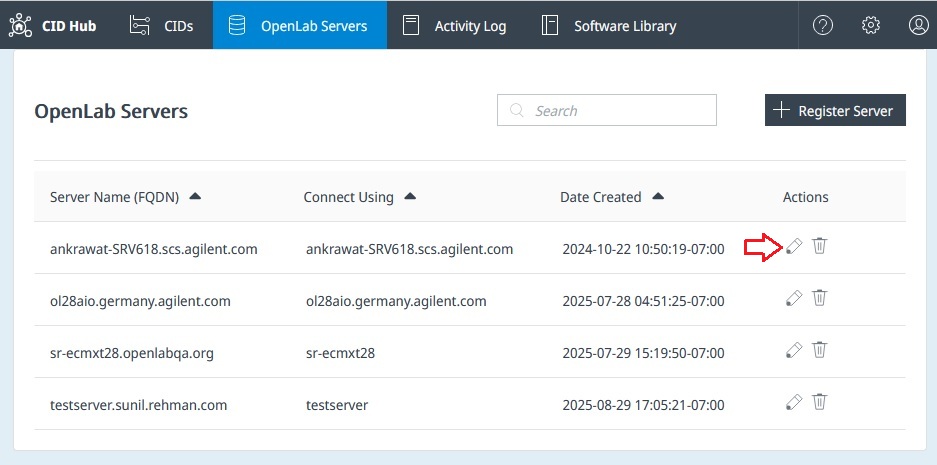
-
Update the required fields.
-
Enter a reason for the change.
-
Click Save.
CID Hub records each changed field and the reason in the Activity Log.
Apply the changes to CIDs
- If you changed Server Name (FQDN) or Connect to this server using, run Register CID for every CID that uses the server.
- After changing the OpenLab administrator credentials or CID Network Share settings, reboot each CID assigned to the server so it uses the updated settings. Wait for ongoing acquisition to finish before rebooting each CID.
See Restart, register, or reset a CID for the Register CID and Reboot System procedures.
See also
- Register an OpenLab Server: create a server record.
- Remove an OpenLab Server: delete a server record that no longer has associated CIDs.
- View activity logs: review the recorded edit.
Last updated: