System requirements
This page lists the network, internet, DNS, certificate, and security requirements for a CID deployment. Each CID controls one analytical system; the requirements below apply per CID. Sections follow the deployment flow: rack and cable, identify the device, address it on the network, choose a topology. Optional services and firewall rules follow, with customer security obligations summarized at the end.
Networking requirements
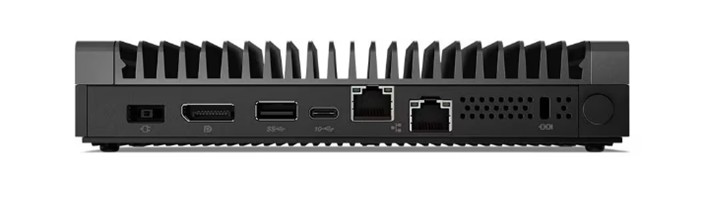
Each CID is equipped with two network interfaces:
- Corporate NIC. Connects to the corporate LAN and provides access to the OpenLab Server and the internet.
- Instrument NIC. Connects to analytical instruments, either directly or via a dedicated instrument LAN/VLAN.
The traffic each NIC must carry is summarized below; the firewall rules behind the outbound internet entries are detailed under Internet requirements. In the tables below, outbound and inbound are from the CID's perspective.
Corporate NIC: corporate LAN and internet
| Direction | Intranet (corporate LAN) | Internet |
|---|---|---|
| Outbound | DHCP, DNS; HTTPS 443 (OpenLab Shared Services (OLSS), OpenLab Server REST APIs, Sample Scheduler, Data Collection, and OpenLab ECM 3.x); TCP 6570 (OpenLab Licensing API) and TCP 27000–27009 (OpenLab licensing) on the OpenLab Server; SMB (optional network share). | See Internet requirements. |
| Inbound | HTTPS (Acquisition Server, diagnostics); SSH and ICMP (troubleshooting, optional). | None required. |
Instrument NIC: instrument network
| Direction | Intranet (instrument LAN/VLAN) | Internet |
|---|---|---|
| Outbound | Acquisition Server to instrument (instrument-specific ports); isolated and unrestricted communication is recommended. | None required. |
| Inbound | Instrument to Acquisition Server (instrument-specific ports); isolated and unrestricted communication is recommended. | None required. |
See the Two-NIC trust topology section of the Security model.
Device identification (MAC and PIN)
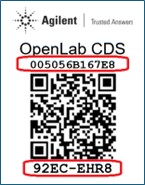
Every CID ships with a QR code sticker on the chassis carrying two identifiers used during network setup and activation:
- The 12-character Corporate NIC MAC address, used to reserve a DHCP lease or register a static DNS record for the device.
- The 8-character PIN, used during activation to link the physical CID with its record in CID Hub.
DHCP and DNS requirements
The CID uses DHCP by default on both interfaces. After activation, you can apply a static configuration to either network.
- Corporate network
- When first connected, the CID's Corporate network uses DHCP to acquire an IP address, DNS servers, and DNS search strings. After activation, a static configuration can be applied.
- On activation, the CID updates its hostname from the factory default (
agilent-cid) to the name specified in CID Hub, then reboots. - If your DHCP servers support dynamic DNS registration (RFC 2136) for Linux systems, the DHCP server registers the CID hostname automatically with the DNS server.
- Otherwise, the desired CID hostnames must be explicitly registered in DHCP and DNS using the device's Corporate NIC MAC address (printed on the QR code label).
- During activation, the CID validates name resolution using
nslookup <hostname>. - CDS clients must resolve CID hostnames to their IP addresses for proper operation.
- Instrument network
- By default, instrument networks are also configured to use DHCP. After activation, a static configuration can be applied to the instrument network.
- The instrument network must not provide a gateway. The Corporate NIC provides the CID's default gateway.
Supported topologies
Two network topologies are supported for connecting an instrument to the CID.
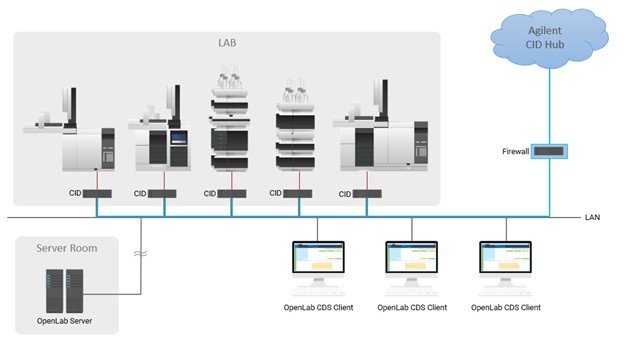
Direct instrument connection
- The Corporate NIC connects to the corporate LAN.
- The Instrument NIC connects directly to the instrument.
- Example: the instrument is set to a static IP of
192.168.1.2, and the CID Instrument NIC is set to192.168.1.3.
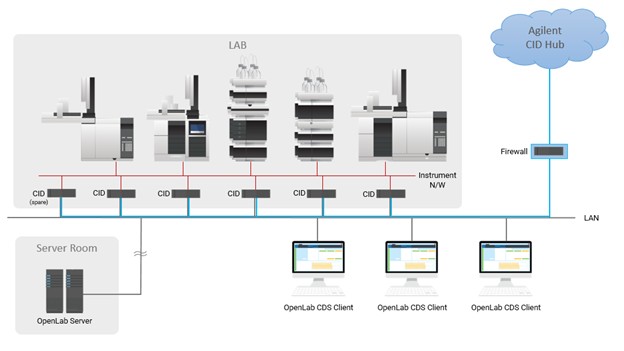
Instrument LAN/VLAN connection
- The Corporate NIC connects to the corporate LAN.
- Instruments and the CID are placed on a dedicated LAN or VLAN.
- Instrument IP assignment may be DHCP or static.
Optional network share
CIDs optionally support using an SMB (Server Message Block) share accessible over the local LAN. In environments with many CIDs, this helps optimize performance and reduce internet bandwidth requirements.
The SMB share must be reachable from the device with at least read permissions to fetch required files. If write access is granted as well, the device can automatically copy downloaded files into the share, making them available for other devices and avoiding repeated downloads.
- Full access (recommended). Cache downloaded CDS VM images for other CIDs to use.
- Read access. Use cached CDS VM images from the network share instead of downloading them from CID Hub.
This is configurable during OpenLab Server registration or later via CID Hub.
After making changes to server settings, CIDs must be rebooted for the changes to take effect. The User Principal Name (UPN) format is recommended for usernames (for example, username@domain.com).
SSL certificate requirements
A CID validates the SSL certificate of every OpenLab server it connects to over HTTPS.
OpenLab ECM 3.x
To run an ECM 3.x server over HTTPS with CIDs, use either a publicly trusted certificate or a certificate issued by an internal, corporate, or self-signed certificate authority (CA). When using a certificate from an internal, corporate, or self-signed CA, import the corresponding CA into CID Hub so that CIDs trust it. See Use corporate certificates.
OpenLab ECM XT / OpenLab Server
OpenLab ECM XT and OpenLab Server, by default, use an OpenLab internal SSL certificate and run over HTTPS. You can use a publicly trusted certificate or a certificate issued by an internal, corporate, or self-signed CA. As with ECM 3.x, import any internal, corporate, or self-signed CA into CID Hub. See Use corporate certificates.
Internet requirements
Your firewall must be configured to allow outbound communication from CIDs to the domains listed below.
CIDs require a continuously available internet connection, not only at activation but for the life of the deployment. The CID uses it to apply security updates, sync time, refresh trusted certificate authorities, report status to CID Hub, and accept on-demand support sessions. OpenLab CDS does not require internet access for its core function of acquiring and processing data from instruments. If the internet path is interrupted, local CDS acquisition and processing continue, and only Hub-mediated functions become unavailable.
All internet traffic is outbound and initiated by the CID. No inbound internet connection is required for the CID to function.
CID Hub and AWS services
| Domain | Port (Protocol) | Purpose |
|---|---|---|
*.agilent.com | 443 (HTTPS, WSS) | Registration API contacted by the CID at activation, and the CloudFront distribution at files.cid.agilent.com from which the CID fetches CID images, driver packages, and CDS installers. Also covers the planned Linux package endpoint, yum.cid.agilent.com, for CID Hub 1.4.0. |
*.iot.us-east-1.amazonaws.com | 443 (HTTPS, WSS / MQTT-over-WSS) | AWS IoT Core endpoint (device shadow, command/job channel, and telemetry between the CID and CID Hub). The CID currently connects to a3cb4mwmdz2oep-ats.iot.us-east-1.amazonaws.com. Because this hostname can change, Agilent recommends allow-listing the wildcard for a stable, long-lived rule. |
data.tunneling.iot.us-east-1.amazonaws.com | 443 (WSS) | AWS IoT Secure Tunneling data plane. The CID joins as the tunnel destination endpoint when a Hub user starts a Windows VM console or Linux Cockpit session, and disconnects when the session ends. See Remote access. |
Single production region. CID Hub runs in AWS us-east-1, where customer and device data resides. CIDs can still fetch Linux packages from the legacy mirror in us-west-2 (see Legacy endpoints).
Legacy endpoints
Keep these rules only while your fleet includes CIDs on older Linux Updates, including newly delivered CIDs. These URLs may be needed for normal operation as well as updates. Installing the applicable Linux Update changes the URLs automatically. Remove each rule once every CID in your fleet has installed the Linux Update shown or a later version.
| Domain | Port (Protocol) | Purpose | Replaced by Linux Update |
|---|---|---|---|
agilent-aws-prd-51-ac-images.s3.amazonaws.com | 443 (HTTPS) | CID image downloads; replaced by files.cid.agilent.com. | 2026.01.12 |
*.s3.us-east-1.amazonaws.com | 443 (HTTPS) | Linux packages at agilent-aws-yum-rpm-repo.s3.us-east-1.amazonaws.com; replaced by yum.cid.agilent.com. | Planned for CID Hub 1.4.0; version pending. |
*.s3.us-west-2.amazonaws.com | 443 (HTTPS) | ClamAV antivirus definitions and OL8 third-party packages at agilent-aws-sbx-51-yum-rpm-repo.s3.us-west-2.amazonaws.com; replaced by yum.cid.agilent.com. | Planned for CID Hub 1.4.0; version pending. |
Windows Update
| Domain | Port (Protocol) | Purpose |
|---|---|---|
*.microsoft.com | 443 (HTTPS) | Windows Update service. |
*.cloudfront.net, *.trafficmanager.net, *.azurefd.net, *.blob.core.windows.net | 443 (HTTPS) | CDN, traffic-management, and binary-blob endpoints used by Windows Update and the PowerShell Gallery. |
*.oneget.org, *.powershellgallery.com | 443 (HTTPS) | PowerShell package sources used by the embedded Windows VM. |
The Windows VM reaches these endpoints through the Linux host via NAT on the Corporate NIC; the VM has no separate egress path.
Endpoint set evolves. Microsoft adds and rotates CDN, Azure Front Door, and binary-delivery hosts continuously. The wildcards above remain stable for firewalls that filter by FQDN or SNI. Firewalls that filter by IP must refresh the rule set periodically against Microsoft's authoritative published list. To identify which specific hostnames the CID's Windows VM is contacting at a given time, monitor outbound DNS from the VM.
Time synchronization
| Domain | Port (Protocol) | Purpose |
|---|---|---|
*.pool.ntp.org | 123 (Network Time Protocol (NTP), UDP) | Public NTP pool used by the CID's chrony service. Accurate time is required for TLS certificate validation, AWS IoT Core authentication, and activity-log timestamps. |
Pool peers rotate. pool.ntp.org returns rotating A records, and the underlying servers and IPs change continuously. The wildcard remains stable for firewalls filtering by FQDN. For firewalls filtering by IP, permitting UDP/123 to the wildcard FQDN is preferred over maintaining a list of pool IPs. To see the peers the CID has currently selected, run chronyc sources on the CID.
Behavior when an endpoint is blocked
The CID does not fail silently; the symptom depends on which endpoint is unreachable.
*.agilent.comunreachable at boot. The CID emits boot-time beep codes (2 beeps when the registration API cannot be reached at activation; 4 beeps for an activated CID that cannot reach the API on bootup). See Beep codes on startup.- AWS IoT Core unreachable. CID Hub shows the device as Disconnected. Hub-initiated commands and configuration changes cannot reach the CID until connectivity is restored. Local CDS data acquisition and processing continue unaffected.
- AWS IoT Secure Tunneling unreachable. Windows VM console and Linux Cockpit sessions initiated from CID Hub cannot be opened, or fail mid-session. The device itself stays connected to AWS IoT Core, and local CDS operation is unaffected.
- S3 or CloudFront unreachable. Image, driver, and CDS package downloads fail with a network error surfaced in the Hub's job and activity log. The CID continues to run with the software it already has.
- Microsoft Update endpoints blocked. Windows Update fails inside the VM. The CID continues to run but stops receiving Windows security patches.
- NTP blocked. Time drift accumulates; eventually TLS handshakes, AWS IoT Core authentication, and CDS client/server setup against the OpenLab Server start failing. See NTP time-sync failure.
For symptoms and connectivity tests, see Verify CID internet connectivity, the entry point into the network failure-mode pages.
Security requirements
Security on a CID deployment is a shared responsibility between Agilent and the customer. The list below is the customer-facing half: the concrete security obligations your organization must satisfy for the deployment to be sound. For the full Agilent-owns / customer-owns split and the reasoning behind it, see the Shared responsibility section of the Security model.
- Network firewall and segmentation. Configure the corporate firewall to permit the outbound domains under Internet requirements, and isolate the Instrument NIC's LAN/VLAN from the corporate WAN and the internet.
- Physical security of the CID. Restrict physical access to the device. Full-disk encryption is not applied on the CID, so physical and network controls are the primary at-rest protection on the device itself.
- Hub user lifecycle. Invite and remove CID Hub users, assign roles, and offboard users when they leave the organization.
- Active Directory and corporate identity. Manage AD or IdP configuration for CDS clients and other customer-managed Windows PCs. The CID's embedded Windows VM does not join AD.
- Update authorization. Authorize when Agilent-delivered updates (Linux, Windows, drivers, CDS) are applied within your change-management window, and confirm via the activity log that they landed.
- CDS client PCs and traditional AICs. OS patching, anti-malware, screen-lock policy, password-cache policy, accurate system clock, and physical access: CID Hub does not manage these systems.
- Sample-data retention and backup. The true record of sample data lives on the OpenLab CDS Server, which is customer-operated and customer-backed-up. Agilent does not back up CID-local CDS data.
- Activity-log review. Incorporate the CID Hub activity log into your own monitoring, review, or SIEM workflow.
- Approval of Agilent support requests. When an Agilent engineer requests remote access to a CID for troubleshooting, a Hub user at your site must approve or decline the request and close the session when work is complete.
Last updated: